September 28, 2026
How to Budget for IT Investments in 2027

Building an IT budget for 2027 looks different than it did a year ago. AI has moved from a side experiment to something employees already use every day. Equipment prices climbed in ways most plans did not anticipate. And the cost of simply keeping current systems patched, monitored, and insurable keeps going up.
Most teams have no trouble filling a wish list. The difficulty is deciding what earns a place in the plan and what can wait another year. Whether you are replacing aging equipment, cleaning up software spend, or trying to hold costs close to flat, a budget works best when every dollar traces back to something the business is trying to accomplish. Here is a practical way to build one that holds up through the year.
Start With an Honest Inventory
Before you can decide what to fund, you need a clear picture of what you already own. List your hardware, software licenses, service contracts, and renewal dates in one place. Then look for three things: equipment past its useful life, software nobody uses anymore, and systems that no longer receive security updates.
Two areas deserve extra attention this year. Many companies are still running laptops and desktops purchased during the remote work rush of 2020 and 2021, which puts those machines well past a normal refresh window. And any device still running Windows 10 has been without security updates since Microsoft ended support in October 2025. Those machines are a security exposure, not a cost savings.
Subscription sprawl is the other place money hides. Licenses purchased for a project that ended, seats for employees who left, and overlapping tools that do the same job tend to renew quietly year after year. A review usually frees up enough budget to fund something you actually need.
Budget Earlier for Hardware, and Build in Room on Price
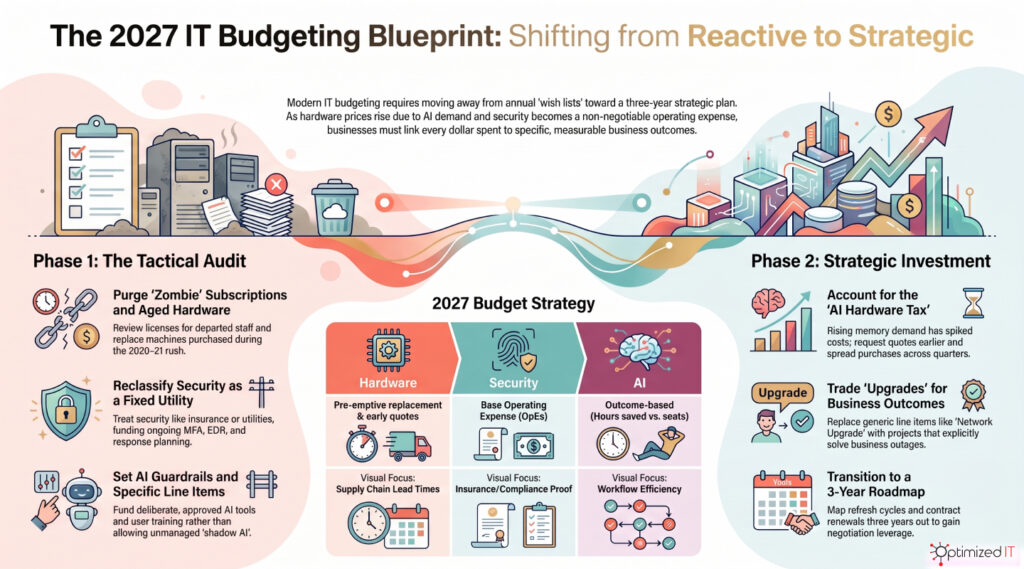
Hardware planning requires more lead time than it used to. Memory prices rose sharply through 2026 as AI data center demand absorbed available supply, and that increase flows into the price of laptops, servers, and networking gear. Delivery timelines have stretched as well.
Waiting until a device fails means paying whatever the market asks that week, on the schedule your vendor can accommodate. A better approach is to set a replacement schedule, spread purchases across quarters instead of stacking them at year end, and request quotes earlier than feels necessary. Leave some room between the number you approve and the number you expect to pay, because quotes are holding for shorter windows than they once did.
If capital is tight, leasing or a device-as-a-service arrangement keeps equipment current and turns a large one-time expense into a predictable monthly cost.
Connect Every Request to a Business Goal
An IT budget should read like a version of your business plan. If you are opening a location or adding staff, the plan needs licensing, endpoints, and network capacity to match. If you are pursuing contracts that require a security questionnaire or a compliance attestation, fund that work before the request for proposal arrives. If customers are asking for faster turnaround, automation and workflow improvements deserve a larger share than a new tool nobody requested.
Tying requests to outcomes also makes budget conversations easier. Leadership rarely approves a line item called “network upgrade.” They do approve a project that removes the outages costing the service team hours every month.
Treat Security as an Operating Cost, Not a Project
Security spending belongs in the base budget, the same way insurance and utilities do. Threats continue to grow more automated and more convincing, and attackers now use AI to write phishing messages that read like they came from a coworker.
Insurance carriers have raised the bar as well. Renewal applications increasingly ask for proof of multifactor authentication, endpoint detection and response, backups that cannot be altered or deleted, and a documented incident response plan. Companies that cannot answer those questions face higher premiums, reduced coverage, or a declined application. Budget for the controls, and budget for the ongoing work that keeps them effective: security awareness training, phishing simulations, and a regular review of who has access to what.
The math has not changed. Recovering from ransomware costs far more than preventing it, and the downtime is usually worse than the ransom.
Give AI a Real Line Item and Real Guardrails
Employees are already using AI tools, whether or not those tools appear in your budget. That is the risk worth planning around. Unmanaged use means company information ending up in consumer applications with no oversight.
Fund it deliberately instead. Decide which tools are approved, budget the per-user license cost, write a short usage policy, and pay for the training that helps people use the tools well. Start with one or two workflows where you can measure the result, such as documentation, customer response drafting, or reporting. Expand once you can show hours saved rather than seats purchased. Also plan for the unglamorous prerequisite: AI produces poor results on disorganized data, so cleanup and permissions work often comes first.
Account for the Costs That Never Appear on a Quote
The purchase price is rarely the whole cost. Implementation, data migration, integration with existing systems, and user training all require funding. Support contracts renew, usually at a higher rate than the prior term. Cloud services bill by consumption, so extra storage, added user accounts, and heavy data transfers can raise monthly spend without anyone approving a change.
Set aside a contingency for the items you cannot predict, and review cloud and subscription invoices quarterly rather than at renewal. Working with a managed IT provider can also flatten this out, replacing variable break-and-fix spending with a predictable monthly cost that includes monitoring, support, and planning.

Plan Past Next December
A one-year budget invites surprises. Map the next three years instead: equipment refresh cycles, contract renewal dates, and known end-of-support deadlines for the software you depend on. Once those are on a calendar, they become scheduled expenses rather than emergencies, and you gain the leverage that comes with negotiating a renewal early.
A three-year view also helps leadership see IT as part of the growth plan instead of a department that shows up once a year asking for money.
Looking Ahead
A strong 2027 IT budget keeps the business secure, productive, and ready for what comes next. Take inventory of what you own, plan hardware purchases earlier than usual, tie each request to a business outcome, fund security as a fixed cost, put structure around AI, and leave room for the expenses that do not show up on a quote. The companies that start this work now will spend the year executing a plan instead of reacting to one problem at a time.
If you would like a second set of eyes on your 2027 plan, OptimizedIT works with businesses across Ohio, Pennsylvania, Northern Kentucky, and southeast Indiana to build technology budgets that match how the business actually runs. Reach out at info@optimizedit.net to start the conversation.